Theming
MaterialTheme gives everything inside it Material 3's color scheme, typography and motion. This page covers color schemes, dark theme, dynamic color from the wallpaper or the desktop's accent color, typography, and building a design system of your own.
MaterialTheme
Wrap your app's content in MaterialTheme, usually once at the top:
Application kompoz::createApplication(int, char**) {
return {.title = "Themed", .content = [] {
bool dark = isSystemInDarkTheme();
MaterialTheme(dark ? darkColorScheme() : lightColorScheme(), App);
}};
}
Components read the theme through composition locals. Read it yourself with colorScheme(), typography() and motionScheme():
void Tag(const std::string& text) {
Text(text, Modifier().background(colorScheme().secondaryContainer, 8).padding(8, 4),
{.font = typography().labelMedium, .color = colorScheme().onSecondaryContainer});
}
MaterialExpressiveTheme is the same with M3 Expressive's springier motion scheme.
Color schemes
A ColorScheme has all of Material 3's color roles, as Compose 1.4's: primary, onPrimary, primaryContainer, secondary, tertiary, error, the surfaces (surface, surfaceContainerLowest … surfaceContainerHighest, surfaceBright, surfaceDim), outline, inverseSurface, the fixed colors and more.
lightColorScheme()anddarkColorScheme()are Material's baseline purple schemes.- Each
on…color is the color for content on the matching container:onPrimaryonprimary,onSurfaceonsurface.contentColorFor(background)finds it for you. - Material containers (
Surface,Card, buttons) setLocalContentColorto their content color, soTextandIconinside them get the right color without being told.
A scheme of your own is a ColorScheme with its fields set. Start from a baseline and change what you need:
ColorScheme brandColors(bool dark) {
ColorScheme cs = dark ? darkColorScheme() : lightColorScheme();
cs.primary = dark ? Color::hex(0x9ECAFF) : Color::hex(0x0061A4);
cs.onPrimary = dark ? Color::hex(0x003258) : colors::White;
return cs;
}From one color
TonalPalette::fromSeed(color) makes the five tonal palettes Material You derives from one color, the way Android 13 does from the wallpaper (its "tonal spot" style), in Material's HCT color space. dynamicLightColorScheme(palette) and dynamicDarkColorScheme(palette) turn them into schemes with Material's tone mapping:
void BrandTheme(const Content& content) {
static const TonalPalette palette = TonalPalette::fromSeed(Color::hex(0x00796B));
bool dark = isSystemInDarkTheme();
MaterialTheme(dark ? dynamicDarkColorScheme(palette) : dynamicLightColorScheme(palette), content);
}
This is the easiest way to a complete, consistent scheme from a brand color. Hct::fromColor(c) and Hct{hue, chroma, tone}.toColor() work in the HCT color space directly.
Dark theme
isSystemInDarkTheme() follows the system's dark mode, and changes while the app runs: from Android's setting, from the XDG desktop portal on Linux, from the browser on the web. Pick the scheme by it, as above.
On Android, tell the system bars whether to draw light or dark icons with SystemBarsAppearance: dark icons over a light theme.
void Root() {
bool dark = isSystemInDarkTheme();
SystemBarsAppearance(!dark);
MaterialTheme(dark ? darkColorScheme() : lightColorScheme(), App);
}
To let the user choose, keep the choice in state and fall back to the system's:
enum class ThemeChoice { System, Light, Dark };

void Root(ThemeChoice choice) {
bool dark = choice == ThemeChoice::System ? isSystemInDarkTheme() : choice == ThemeChoice::Dark;
MaterialTheme(dark ? darkColorScheme() : lightColorScheme(), App);
}Dynamic color
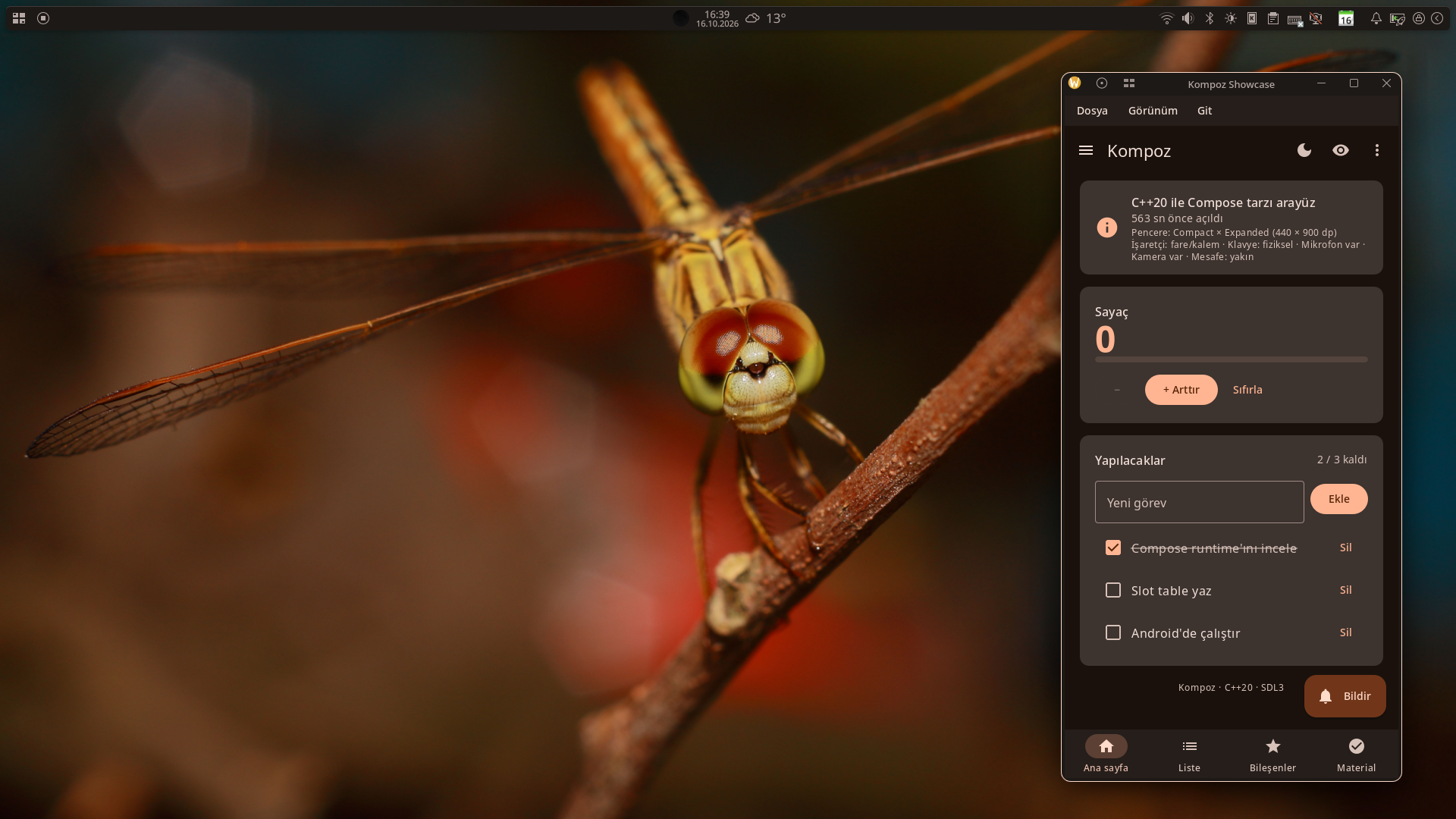
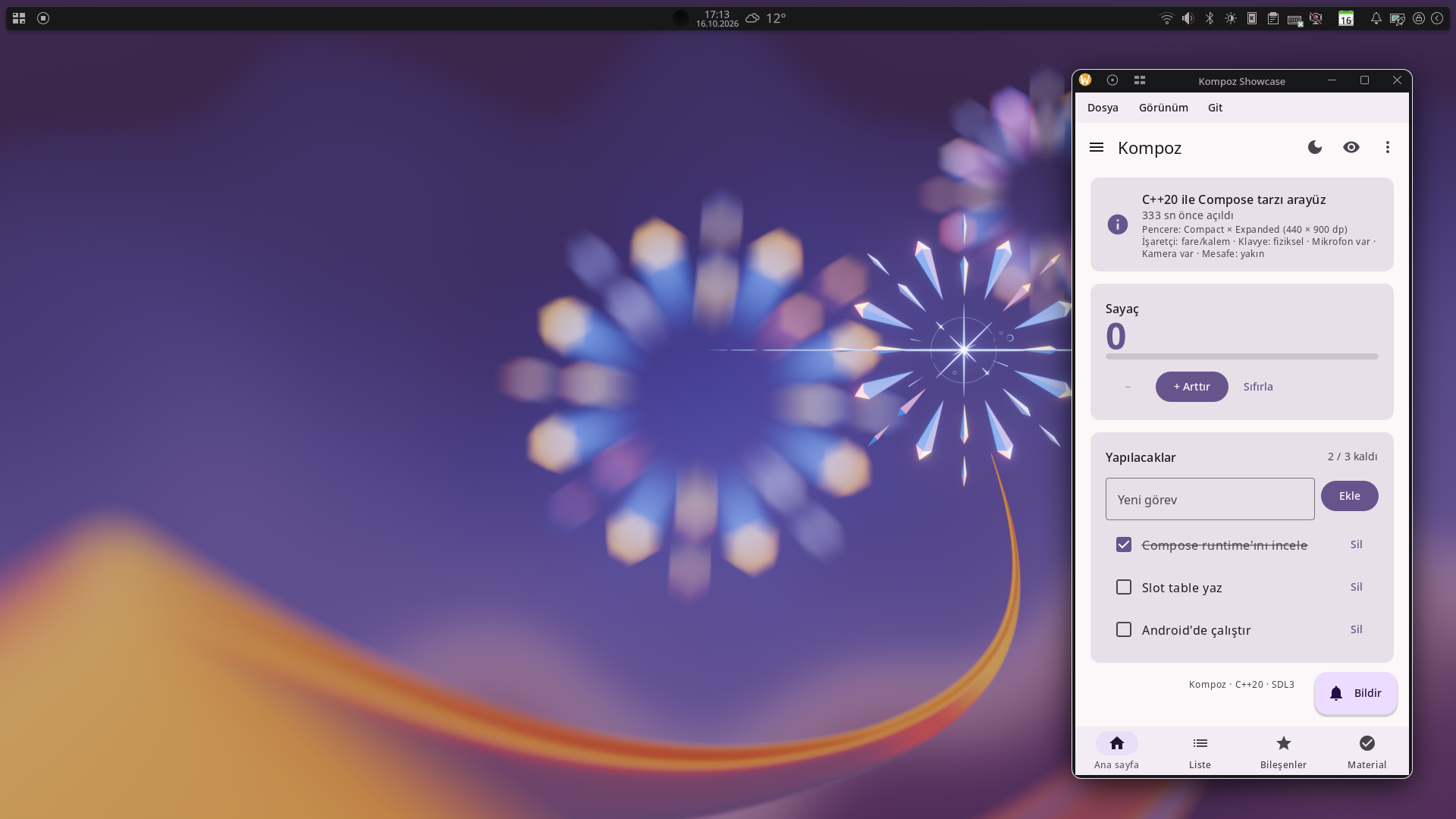
A theme's colors can come from three places, and Kompoz offers each as an API of its own. Which one an app uses is the app's decision, or its user's: Kompoz never switches from one to another by itself.
| Source | Schemes | Where it is available |
|---|---|---|
| The app's own colors | lightColorScheme(), darkColorScheme(), or a scheme of your own (TonalPalette::fromSeed of a brand color) | Everywhere. |
| The system's palette | dynamicLightColorScheme(), dynamicDarkColorScheme(); isDynamicColorAvailable() | Android 12+ (the palette the system made, from the wallpaper or the colors the user picked); Linux desktops that give an accent color through the XDG portal (on KDE, the color scheme's accent); Windows 10 and 11 (the accent color in Settings > Personalization > Colors). |
| The wallpaper itself | wallpaperLightColorScheme(), wallpaperDarkColorScheme(); isWallpaperColorAvailable() | Linux (KDE Plasma; GNOME, Cinnamon and MATE; Xfce), Windows, Android 8.1+. |
The system's palette follows what the user chose in the system's settings, so an app that uses it matches the rest of the desktop. The wallpaper's colors are picked from the picture itself the way Android picks them (TonalPalette::fromImage), also on desktops whose own colors don't follow the wallpaper. On Android, where apps can't see the colors' populations, the seed is the first of the system's main wallpaper colors that isn't grey, as System UI takes it in that case. Both update while the app runs, when the wallpaper, the accent color or the theme changes; where a source has nothing, its schemes are the baseline ones, so an app can always fall back to its own colors.
Let the user choose, and keep the choice:
enum class ColorSource { App, System, Wallpaper };

void Root(ColorSource source) {
bool dark = isSystemInDarkTheme();
ColorScheme scheme = source == ColorSource::System && isDynamicColorAvailable()
? (dark ? dynamicDarkColorScheme() : dynamicLightColorScheme())
: source == ColorSource::Wallpaper && isWallpaperColorAvailable()
? (dark ? wallpaperDarkColorScheme() : wallpaperLightColorScheme())
: (dark ? darkColorScheme() : lightColorScheme());
MaterialTheme(scheme, App);
}
The showcase asks this way, in its View menu and on its Material screen.
Colors from any picture
TonalPalette::fromImage(bitmap) makes Material You's palettes from any picture, as the wallpaper's are made: an album's cover, a profile photo. It does what Android does with a wallpaper: the picture scaled to at most 112 × 112 of area without filtering, as WallpaperColors scales it; quantizeColors(bitmap) finds the colors it is made of and how much of each (the Celebi quantizer Android and Material Color Utilities use); seedColors(colors) ranks those that would make good theme seeds as Android's System UI ranks a wallpaper's, up to four, so you can offer the user a choice of seeds as Android's wallpaper picker does:
void CoverTheme(const ImageBitmap& cover, const Content& content) {
TonalPalette palette = remember(cover, [&] { return TonalPalette::fromImage(cover); });   // once per picture
MaterialTheme(isSystemInDarkTheme() ? dynamicDarkColorScheme(palette) : dynamicLightColorScheme(palette), content);
}
KOMPOZ_NO_DESKTOP_ACCENT=1 and KOMPOZ_NO_WALLPAPER_COLORS=1 leave out the desktop's accent color and the wallpaper's colors, for screenshots that are the same on every machine.
Animating a theme change
ColorScheme::map applies a function to every color. With animateColorAsState, each color animates to its new value when the scheme changes:
ColorScheme animateColorScheme(const ColorScheme& target, CallSite site = CallSite::current()) {
ComposableScope scope(site);   // a stable identity for the animations inside
return target.map([](Color c) { return animateColorAsState(c, 400); });
}

void Root(bool dark) {
MaterialTheme(animateColorScheme(dark ? darkColorScheme() : lightColorScheme()), App);
}
Each animateColorAsState call inside map runs in the same order every time, so each color keeps its own animation.
Typography
Typography holds Material 3's type scale: displayLarge, displayMedium, displaySmall, headlineLarge … headlineSmall, titleLarge … titleSmall, bodyLarge … bodySmall and labelLarge … labelSmall. Each is a Font: a size in sp, a weight, a letter spacing and a line height. Use them through typography():
Text("Settings", {.font = typography().headlineSmall});
Text("Notifications are on", {.font = typography().bodyMedium});
To change the type scale, provide your own Typography through LocalTypography:
void BrandTypography(const Content& content) {
static const FontFamily lora = FontFamily::fromFiles({{"fonts/Lora-Regular.ttf"}, {"fonts/Lora-Bold.ttf", FontWeight::Bold}});
Typography type;
for (Font* f : {&type.displayLarge, &type.displayMedium, &type.displaySmall, &type.headlineLarge,
&type.headlineMedium, &type.headlineSmall})
f->family = lora.id;
CompositionLocalProvider({LocalTypography.provides(type)}, content);
}
Font files are assets (see Resources). The generic families FontFamily::Serif and FontFamily::Monospace use the system's fonts where there are some. Text sizes follow the system's font scale.
Shapes
Components have Material's shapes built in: a button's full rounding, a card's 12 dp corners, a sheet's 28 dp top corners. There is no theme-wide Shapes object to change them all at once; pass a shape where a component takes one, and use RoundedCornerShape, CutCornerShape, CircleShape or the Material shape library (MaterialShapes) for your own.
A design system of your own
When your app doesn't follow Material, build your own theme the same way MaterialTheme is built: put the tokens in a struct, provide it through a CompositionLocal, and read it through a small accessor:
struct BrandColors {
Color accent, background, text;
friend bool operator==(const BrandColors&, const BrandColors&) = default;
};

inline const CompositionLocal<BrandColors> LocalBrandColors{
BrandColors{Color::hex(0xFF5722), colors::White, Color::hex(0x212121)}};

inline const BrandColors& brandColors() { return LocalBrandColors.current(); }

void BrandTheme(BrandColors colors, const Content& content) {
CompositionLocalProvider({LocalBrandColors.provides(colors), LocalContentColor.provides(colors.text)}, content);
}

void BrandButton(const std::string& label, std::function<void()> onClick) {
Box(Modifier().clickable(std::move(onClick)).background(brandColors().accent, 8).padding(16, 10), [&] {
Text(label, {.color = brandColors().background});
});
}
You can mix both: keep MaterialTheme for Material components and add your own locals for what Material doesn't cover.
See also
- CompositionLocal: how themes reach components.
- Material components: what the theme styles.
- Text: fonts and text styles.